Dashboard View – Progress Overview
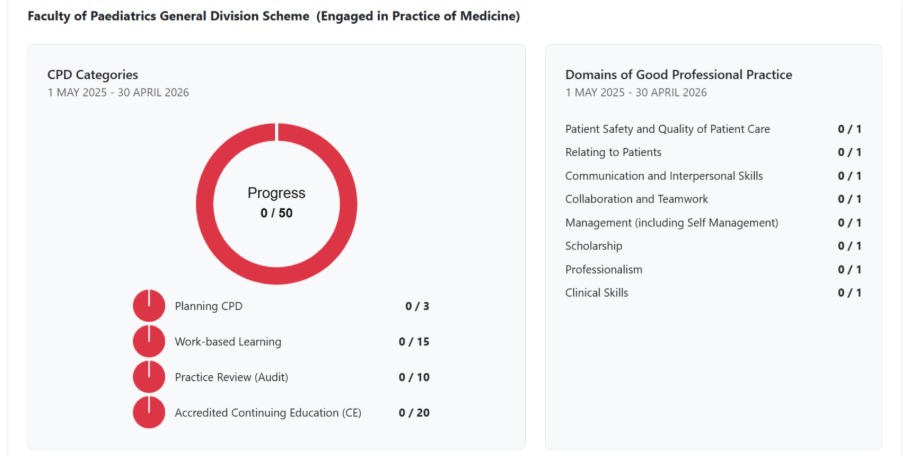
When you click Dashboard, you are taken to a page that displays your CPD progress in a clear, visual format.
Key Elements:
Progress Circle (Center-Left):
A large circular progress indicator shows your total CPD credits completed out of the required 50.
Example: Progress 0 / 50 means no credits have been logged yet.
The circle will populate green as you begin to record your activities.
CPD Categories (Left Panel):
Below the progress circle, you’ll see a breakdown of credits by category:
Planning CPD: 0 / 3
Work-based Learning: 0 / 15
Practice Review (Audit): 0 / 10
Accredited Continuing Education (CE): 0 / 20
Domains of Good Professional Practice (Right Panel):
Lists eight domains, each requiring at least one activity:
Patient Safety and Quality of Patient Care
Relating to Patients
Communication and Interpersonal Skills
Collaboration and Teamwork
Management (including Self-Management)
Scholarship
Professionalism
Clinical Skills
Each domain currently shows 0 / 1 until activities are logged.
Purpose:
This dashboard gives you an at-a-glance view of your progress toward meeting CPD requirements for the current cycle (e.g., 1 May 2025 – 30 April 2026).
Related Articles:
How to Access MyCPD for Professional Competence
Getting started with MyCPD for Professional Competence
Helpful Videos:
Was this article helpful?
That’s Great!
Thank you for your feedback
Sorry! We couldn't be helpful
Thank you for your feedback
Feedback sent
We appreciate your effort and will try to fix the article