What is Accredible?
Accredible is a platform designed for creating and managing digital certificates. It has issued millions of digital certificates globally, helping professional associations recognize career qualifications and achievements.
As of March 2021, Accredible is SOC2 Type 2 AICPA Certified. This certification means that Accredible has been audited and certified by one of the most reputable accreditation standards auditors, ensuring high levels of security and data privacy. Starting from April 2025, RCPI Membership, Fellowship, Postgraduate Training, and Diploma Certificates will be issued digitally via Accredible.
Different Ways to Access your Certificates Issued since April 2025 via Accredible:
Issuing email: When a certificate is issued, the recipient will receive an email with a link to their certificate. From there, they can share the certificate with themselves or others via email or various media channels (e.g., LinkedIn, WhatsApp, Facebook).
Retrieve Credentials Link: Visit the Retrieve Credentials page on Accredible, enter the email address to which the certificate was issued, and you will receive a link to access all certificates associated with that email.
Accredible Wallet: Sign in to your Accredible Wallet, which is your personal account with Accredible. Use the email associated with your RCPI account. If you don't have a password, follow the "forgot password" steps on the Accredible Login page.
RCPI Login: To access your certificate using your RCPI account (email and password), visit the relevant department outlined below. If your credential is not linked to a login, a message will notify you that your credentials are in progress. This indicates that you may have selected the wrong department login.
Certificate/Credential Specific Logins:
- Professional Diploma or Certificate issued on Accredible from May 2025, visit Continuous Learning. If unsure, see all certificates issued by this department here.
- BST, CSCST, or Aspire Fellowships Certificates issued on Accredible from May 2025, visit Postgraduate Training. If unsure, see all certificates issued by this department here.
- Membership and Fellowship Certificate issued on Accredible from May 2025, visit Membership & Fellowship. If unsure, see all certificates issued by this department here.
- International Clinical Fellowship, Residency, or other International Programme Certificate issued on Accredible from May 2025, visit Postgraduate International Training. If unsure, see all certificates issued by this department here.
Feel free to reach out if you need any more information or assistance.
Do I need an Accredible Account to Access my Certificate(s)?
No, you do not need an Accredible account to access your credentials. After successfully completing your RCPI course, exam, training, or being awarded a Membership or Fellowship, you will receive an email with a secure link to your digital certificate. This link allows you to view, share, and verify your certificate without needing to create an Accredible account.
This link is a 'One-Click' link, meaning that the first time you use, it will automatically sign you into your credential, without needing a password. At this time you will have access to all private features, including downloading a PDF of your certificate.
If you wish to access private features at a later date, you will need to create an Accredible account. Please follow the instructions in the 'How do I Create an Accredible Account?' section in this article.
Why Create an Accredible Account?
Creating an Accredible account offers some benefits:
- Centralised Access: Easily manage and access all your digital certificates in one place, including those issued across RCPI departments and other institutions using Accredible.
- Access to privacy settings
- PDF Download: Easily download a PDF copy of your certificate
- While you don't need an Accredible account to access your credentials, having one can enhance your experience and provide additional functionality.
How do I Create an Accredible Account?
Via One Click Link
If you have accessed your credential via a One-Click link, you will see a prompt at the top of your credential asking you to set a new password for your account. Once your new password is set, you will be able to sign into your credential at any time using this password and the email address your credential is associated with.
Via the Sign-In Button
1. If you are on the public view of a credential, and not currently signed in, you can click the 'Sign in' button at the top-right-hand corner of your credential or wallet view or the 'Sign in to access more options' button located below the certificate view.
2. On the 'Sign in' page, click 'Forgot password?'
3. Using the 'Forgot password' function and the email address your credential is associated with, set yourself a new password for your Credential Wallet.
4. You will receive a security email from Accredible confirming your new password and allowing you to sign in to your Credential Wallet.
Below is a Quick Summary on how to Download a PDF Version of your Digital Certificate:
To download a PDF version of your digital certificate, click into your certificate link and click 'sign in to access more options':
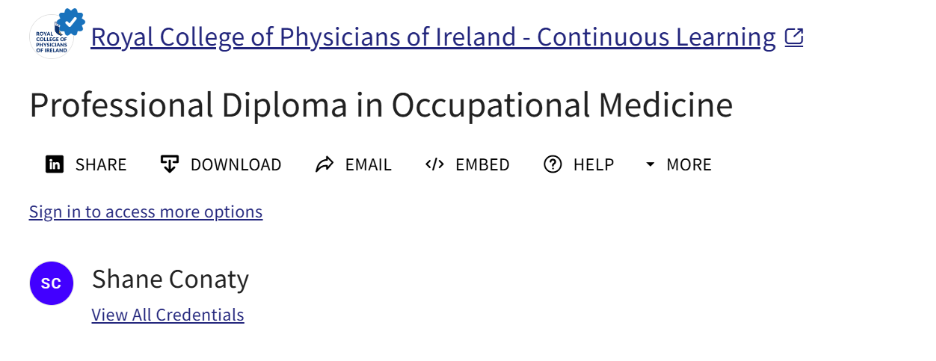
You can sign into Accredible when prompted, with this link:
Can I Download and Print my Certificate?
Digital First: We encourage you to share the digital link to your certificate with third parties. This method not only helps reduce paper usage but also enables others to easily verify your credentials.
RCPI offers PDF downloads of certificates through the Accredible platform. Please note that you must be logged into your Accredible account to download a PDF copy of your certificate. RCPI has implemented QR codes on all credentials, allowing instant verification by linking directly back to the original digital credential.
You can download a PDF version of your certificate directly from the link in your issuing email. Please note that this link is a 'One-Click' link, meaning that the first time you use it will automatically sign you into your credential, without needing a password. At this time you will have access to all private features, including downloading a PDF of your certificate.
If you wish to download a PDF of your certificate at a later date, you will need to create an Accredible account. Please follow the instructions in the 'How do I create an Accredible Account' section in this article to create an account.
How to Download a PDF of your Certificate from your Issuing Email:
1. When a certificate is issued, you will receive an email with a link to your certificate. This link is a 'One-Click' link, meaning that the first time you use it will automatically sign you into your credential, without needing a password. Click on this link to view your credential.
2. From there, scroll down to the bottom of the credential window, click 'Download' and select the ‘PDF’ button. A PDF version of your certificate will open in a new browser window.
- If you cannot see the 'PDF' option, you will need to follow the instructions in the section below titled 'How to Download a PDF of your Certificate if the PDF Option is not Visible'
3. Click the 'Download' icon in the top right of the PDF viewer to save the file to your computer.
4. Printing your certificate: Open the downloaded PDF file, go to ‘File’ > ‘Print’, and follow your computer’s printing instructions.
How to Download a PDF of your Certificate if the PDF Option is not Visible:
1. Access your credential using one of the methods listed in the 'Different Ways to Access your Certificates Issued since April 2025 via Accredible' section above.
2. Click on the 'Sign in to access more options' option located below the certificate view or 'Sign In' button at the top right-hand corner of your credential view.
3.Use the email address your credential was sent to and the password you created for your credentials. If you have not yet set up a password for your credentials, use the 'Forgot Password?' function to create one for yourself now.
4. Once you have successfully signed in, scroll down to the bottom of the credential window, click 'Download' and select the ‘PDF’ button. A PDF version of your certificate will open in a new browser window.
5. Click the 'Download' icon in the top right of the PDF viewer to save the file to your computer.
6. Printing your certificate: Open the downloaded PDF file, go to ‘File’ > ‘Print’, and follow your computer’s printing instructions.
What if I cannot see the PDF Option on the Credential Window?
If the ‘PDF’ button is not visible, you will need to log in to your Accredible account. Please follow the instructions in the section above: 'How to Download a PDF of your Certificate if the PDF Option is not Visible.'
Digital Certificates Issued by RCPI on the Accredible Platform:
RCPI has begun issuing digital Certificates on the Accredible platform since April 2025.
To view all Certificates currently being issued, visit the following links:
- Continuous Learning: To see the list of professional diplomas and Certificates, click here
- Postgraduate Training: To see the list of BST, CSCST & Aspire Fellowship Certificates, click here
- Membership and Fellowship: To see the list of Memberships and Fellowship Certificates, click here
- Postgrad International Programmes: To see International Clinical Fellowship, Residency or other International Programme Certificates, click here
What is a Digital Certificate?
Everything you need to know about your certificate:
After successfully completing your RCPI course, exam, training, or being awarded a Membership or Fellowship, you will receive an email with a secure link to your digital certificate. The certificate is issued by Accredible and serves as a means for you to validate and share your accomplishment. Its authenticity can be easily verified by anyone at any time.
With the secure digital certificate, your new skills and knowledge can be verified and shared with employers, colleagues, or family. This can be done in the following ways:
- Adding it to your ‘Certifications’ on LinkedIn: You can do this with one click on the credential.
- Sharing it on your relevant social media feeds: Update your network with your new achievement.
- Adding your certificate and qualification to your email signature: Communicate your new status with your colleagues.
Although we issue digital certificates, which our alumni find to be convenient as well as more environmentally friendly, you still have the option to order a printed copy.
Why RCPI Implemented Accredible Digital Certificates
RCPI adopted Accredible digital certificates to enhance the way we recognize and share professional achievements. This move aligns with our commitment to innovation, accessibility, and sustainability in medical education and professional development.
Key Reasons for the Implementation:
Secure and Verifiable Credentials:
Accredible certificates are digitally secured and tamper-proof. Each certificate includes a unique verification link, allowing employers, peers, and institutions to instantly confirm its authenticity—anytime, anywhere.
Easy Sharing and Professional Visibility:
With Accredible, recipients can:
- Add their certificate to the ‘Certifications’ section on LinkedIn with a single click.
- Share their achievement across social media platforms.
- Include their credentials in email signatures to highlight their qualifications in daily communications.
Environmentally Friendly and Convenient:
Digital certificates reduce paper use and shipping, supporting RCPI’s sustainability goals. They are also instantly accessible, eliminating delays associated with printing and mailing.
Optional Printed Copies:
While digital certificates are the default, we understand that some individuals prefer physical copies. RCPI will continue to offer the option to order a printed version for those who wish to display their achievement in a traditional format.
By implementing Accredible, RCPI ensures that your hard-earned qualifications are not only recognised but also easily shareable and verifiable in today’s digital-first world.
Will I Receive a Printed Copy of my Certificate?
If you are attending your Conferring Ceremony, you will receive a printed copy of your certificate on the day. For those not attending, or for courses without a conferring ceremony, digital certificates will be issued by default. Accredible digital certificates are secure, easily shareable and environmentally friendly.
However, we understand that some individuals prefer a physical copy to display their achievement. As part of our digital change, there is now a charge applicable for a printed certificate request. The payment structure is as follows:
Pricing for Physical Certificate Requests:
Digital and Print Certificate - Ireland and UK Delivery - €100.00
Digital and Print Certificate - Europe Delivery - €120.00
Digital and Print Certificate - Rest of the World Delivery - €230.00
Digital and Print Certificate - Collected by Candidate from RCPI - €70.00
How can I Request a Printed Copy of my Certificate?
Iheed Certificates:
To request a printed Iheed Certificate, please use the following link: Request your Certificate. Please ensure that you meet the eligibility criteria listed on the request link before submitting your request.
All other RCPI Certificates:
To request a printed copy of your Certificate (e.g., MRCPI, FRCPI, CSCST), please contact registry@rcpi.ie
Replacement Certificates: If your previously issued print certificate has been lost or damaged, please contact registry@rcpi.ie to request a replacement copy. Please note that you will need to complete a declaration form, have it signed by a Commissioner for Oaths and pay the relevant fee to have a replacement certificate issued.
Print certificate orders are processed on the 15th of each month and are sent via DHL Express.
Department Contacts and Certificate Links:
Below is a list of departments, the types of certificates they issue, links to view the certificates available on Accredible, and the relevant contact information for assistance.
Department | Department Name | Departments | View Certificates | Help Contact |
Training | Continuous Learning: | BST Certs | ||
CSCST (HST) Certs | ||||
Aspire Fellowship Certs | ||||
Education | Continuous Learning | Education RCPI Certs | courses@rcpi.ie | |
Iheed Diploma Certs | ||||
International | Postgraduate International Programmes | International Postgraduate Programme Certs | training@rcpi.ie | |
Membership | Membership and Fellowship | RCPI Membership and Fellowship Certs |
Explore Accredible’s Knowledge Base on using Digital Credentials here.
This resource provides a comprehensive guide on how to use digital credentials, including verification, sharing, and managing your certificates.
Was this article helpful?
That’s Great!
Thank you for your feedback
Sorry! We couldn't be helpful
Thank you for your feedback
Feedback sent
We appreciate your effort and will try to fix the article